Architecture
Overview
How Tala WTE works, verified from the source. It is a single Go binary that embeds everything needed to run a wireless lab: the database and web console, the captive portal engine, an OpenLDAP directory, a FreeRADIUS server, and an internal certificate authority. Nothing is installed or wired together beyond the binary itself.
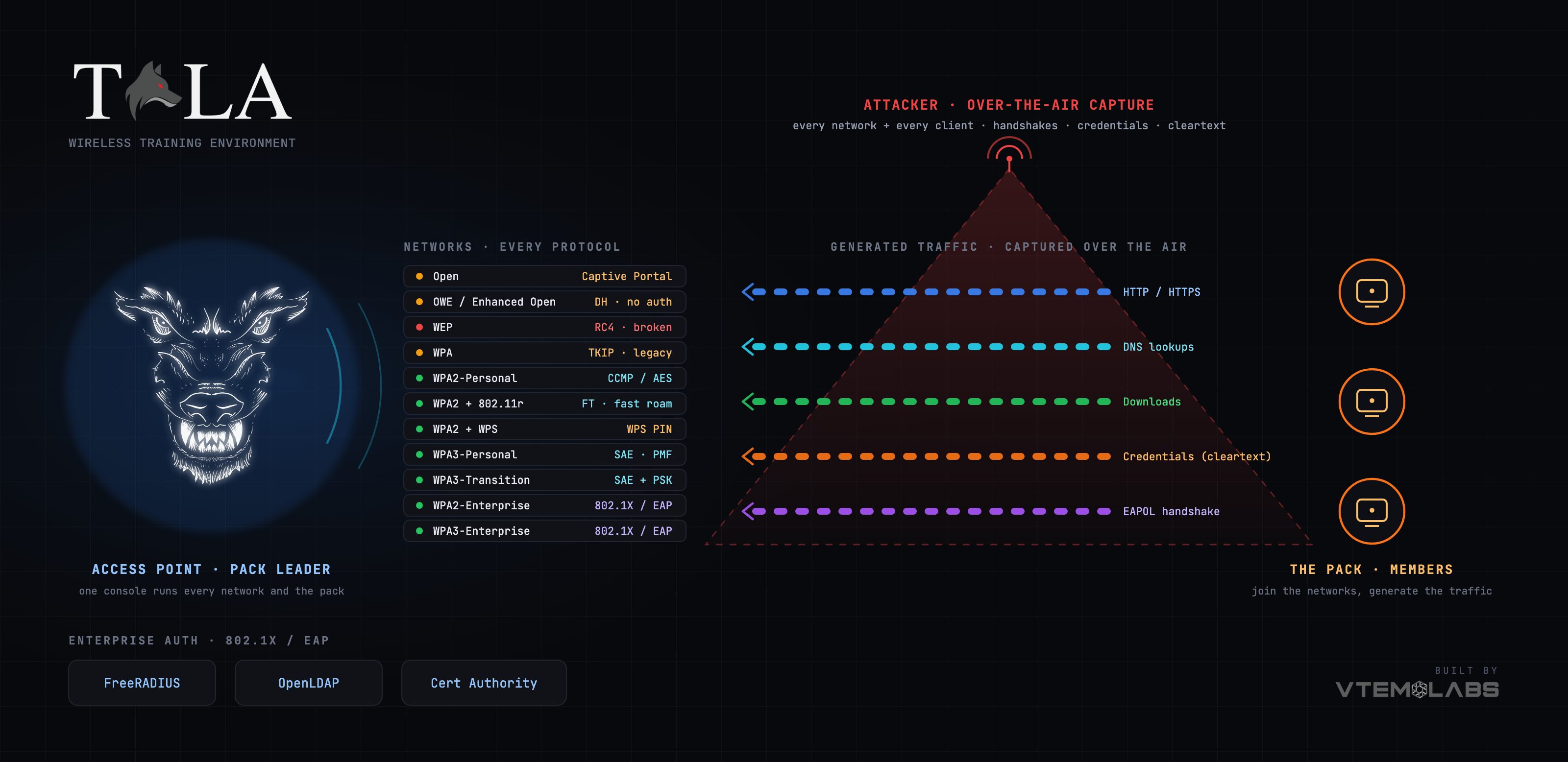
One binary, everything embedded
The binary ships with these pieces baked in:
- A web console built with SvelteKit, served as static assets.
- PocketBase for the database, realtime updates, and superuser (admin) authentication.
- A captive portal engine that manages dnsmasq, iptables redirection, a per-network HTTP server, and a MAC allowlist.
- An OpenLDAP directory (slapd) and a FreeRADIUS server for enterprise 802.1X authentication.
- An internal certificate authority for the certificates EAP requires.
- An embedded terminal so the host shell is one click away in the browser.
The console is served over HTTPS on port 8443. The binary generates a self-signed server certificate for itself and runs a reverse proxy: 0.0.0.0:8443 terminates TLS and forwards to PocketBase on 127.0.0.1:8090. Port 80 exists only to redirect to HTTPS on 8443. The self-signed certificate is why browsers show a security warning the first time (see Troubleshooting).
All persistent state lives under /var/lib/tala-wte: the PocketBase database, packet captures, portal bundles, the LDAP directory, RADIUS config, and the certificate authority. This path is preserved across reinstalls.
Service ports
8443HTTPS console (reverse proxy to PocketBase on127.0.0.1:8090).80HTTP, redirects to 8443.3389OpenLDAP (ldap://127.0.0.1:3389), the directory RADIUS checks. Base DNdc=tala,dc=wte.1812FreeRADIUS (EAP / 802.1X).
Two roles in one binary
The same binary runs in either of two roles, switched from Settings:
- Server (AP) role broadcasts the target networks with hostapd. A server can also act as a pack leader (see The Pack below).
- Client role joins the access points and generates realistic traffic so a network is never silent during an exercise. It associates, pulls a DHCP lease (retrying, since a single attempt right after association often misses the server's first offer), and gets past a captive portal if one is present.
Switching role installs the other role's dependencies and restarts the service.
How a network starts and stays isolated
Each running network is fully isolated from every other network and from the host using a Linux network namespace. When you start a network, the manager runs roughly this sequence:
- For an enterprise network, run the enterprise preflight and (if requested) auto-provision the stack first. See "Enterprise authentication" below.
- Discover the free wireless adapters and claim one. A running network's radio lives inside that network's namespace, so it disappears from the host adapter list; only free adapters remain visible. If the adapter you saved with is gone, the manager auto-claims the best free real adapter (and a compatible band), or, from the Details page, proposes one for you to confirm.
- Create a network namespace named
wte-<id>, where<id>is the network's record ID (note the hyphen), and bring up loopback inside it. - Set up internet passthrough: create a veth (virtual ethernet) pair, move one end into the namespace, address both ends on a private
192.168.<n>.0/24link (host.1, namespace.2), add a default route inside the namespace via the host end, enable IP forwarding (which is per-namespace, so it must be set inside the namespace too), and add a host-side MASQUERADE (SNAT) rule out the uplink interface plus a namespace-side masquerade. This is what lets connected clients reach the internet through the uplink. - Move the wireless PHY into the namespace with
iw phy <phy> set netns name wte-<id>. - Build and launch hostapd inside the namespace (
ip netns exec wte-<id> hostapd ...) to bring up the access point. - Assign the gateway IP to the AP interface inside the namespace. By default the client subnet is
10.0.0.0/24: gateway10.0.0.1, DHCP pool10.0.0.10-10.0.0.250. The default subnet is configurable in Settings and per network. - If client isolation is on, add a FORWARD drop inside the namespace so connected stations cannot reach each other.
- Start the per-network service: either the captive portal engine (if the network has a portal) or dnsmasq, again inside the namespace. dnsmasq serves both DHCP (12-hour leases) and DNS, handing clients the AP gateway as their router and resolver, with
8.8.8.8and1.1.1.1as upstreams.
Both hostapd and dnsmasq run inside the per-network namespace, never in the root namespace. That is the core isolation guarantee: each network is its own radio, its own subnet, its own DHCP/DNS, and its own NAT, with the only shared resource being the root-namespace MASQUERADE to the uplink.
Data flow for a connected client
A client that joins network wte-<id> associates to hostapd in that namespace, gets a DHCP lease from dnsmasq in that namespace (gateway 10.0.0.1 by default), and sends traffic to that gateway. The namespace routes it over the veth pair to the host end, where the root-namespace MASQUERADE rewrites it out the uplink interface to the internet. Replies return the same way. Turning Internet Passthrough off omits the NAT, so the network is walled and local-only.
Stopping and teardown
Stopping a network tears down in reverse: stop dnsmasq or the portal, stop hostapd, remove the veth tunnel and its NAT rule, return the PHY from the namespace back to the host, delete the wte-<id> namespace, and let the radio settle. There is also a NuclearTeardown reset that finds every wte- namespace, returns each radio to the host, removes the matching veths and NAT rules, and kills stray hostapd/dnsmasq processes. Note that running a Tala WTE CLI subcommand while the service is up triggers this teardown on exit, which stops all running networks.
One adapter, one network
Because each running network claims a radio and moves it into its own namespace, one AP-capable adapter hosts one network at a time. To broadcast multiple networks simultaneously, add more adapters; each running network needs its own.
Enterprise authentication (802.1X)
WPA2/WPA3-Enterprise networks authenticate with 802.1X / EAP. The chain is:
Wi-Fi client -> EAP -> hostapd (AP) -> RADIUS :1812 -> LDAP :3389 -> Access-Accept -> 4-way handshake -> connected
hostapd (running in the namespace) forwards 802.1X to FreeRADIUS, which validates the user against the OpenLDAP directory. EAP-TLS additionally needs certificates from the internal CA.
Because all of this has dependencies (a CA, a server certificate, LDAP users, FreeRADIUS modules and service), the Start button becomes Auto-provision & Start when anything is missing. Auto-provision is idempotent and runs in dependency order: initialize the CA, issue the FreeRADIUS server certificate, provision a default user directory if empty, write the RADIUS clients config (authorizing the loopback and the veth range with the shared secret), enable the EAP and LDAP modules (the LDAP module wired to ldap://127.0.0.1:3389/dc=tala,dc=wte), install the certificates, apply the saved EAP type (PEAP by default), start slapd if needed, validate the config, and restart FreeRADIUS. RADIUS packets travel from hostapd in the namespace, over the namespace gateway, to FreeRADIUS on the host.
The Pack
A server can act as a pack leader and drive a pack of client members, so one operator orchestrates a whole fleet from one console. The leader reaches each member over the member's own HTTPS console (the same self-signed cert on port 8443). Because that certificate is self-signed and not in any trust store, the leader does not use normal TLS verification. Instead it pins each member: it accepts the connection only when the presented certificate's fingerprint matches the one recorded for that member, and it authenticates every call with the member's agent key. The agent key is shown on each client under Settings; you register a member on the leader by its address and key (or discover it on the LAN). Regenerating the key on a member instantly cuts off any leader holding the old one.
The leader deploys a network's client config plus a traffic profile to a member, the member joins the network and starts generating traffic, and live per-member status comes back to the leader. Stopping a member, or stopping or deleting the network it is on, tears the member down automatically. The leader can also push an architecture-matched binary update to its whole pack. See The Pack for operation.
Software stack (verified from the binary's dependencies)
- Backend: Go, PocketBase (embedded database, realtime, superuser auth), Go standard
net/http. - Frontend: SvelteKit / Svelte, TypeScript, built to static assets and embedded.
- Access points: hostapd, plus
iwfor regulatory domain and radio control. - Network services: dnsmasq (DHCP and captive DNS), iptables and iproute2 (NAT and per-network namespaces).
- Enterprise auth: FreeRADIUS, OpenLDAP, and the internal certificate authority.
- Capture and analysis: tshark, tcpdump, and capinfos (the Wireshark CLI suite).
See also: Installation, Settings, The Pack, Troubleshooting, Security and License.